AI Avatar Generator: Create Custom Avatars & Profile Pictures (Free)
Learn how to create unique AI-generated avatars and profile pictures for social media, gaming, and professional use. Compare the best AI avatar generators, discover effective prompts, and get started for free.
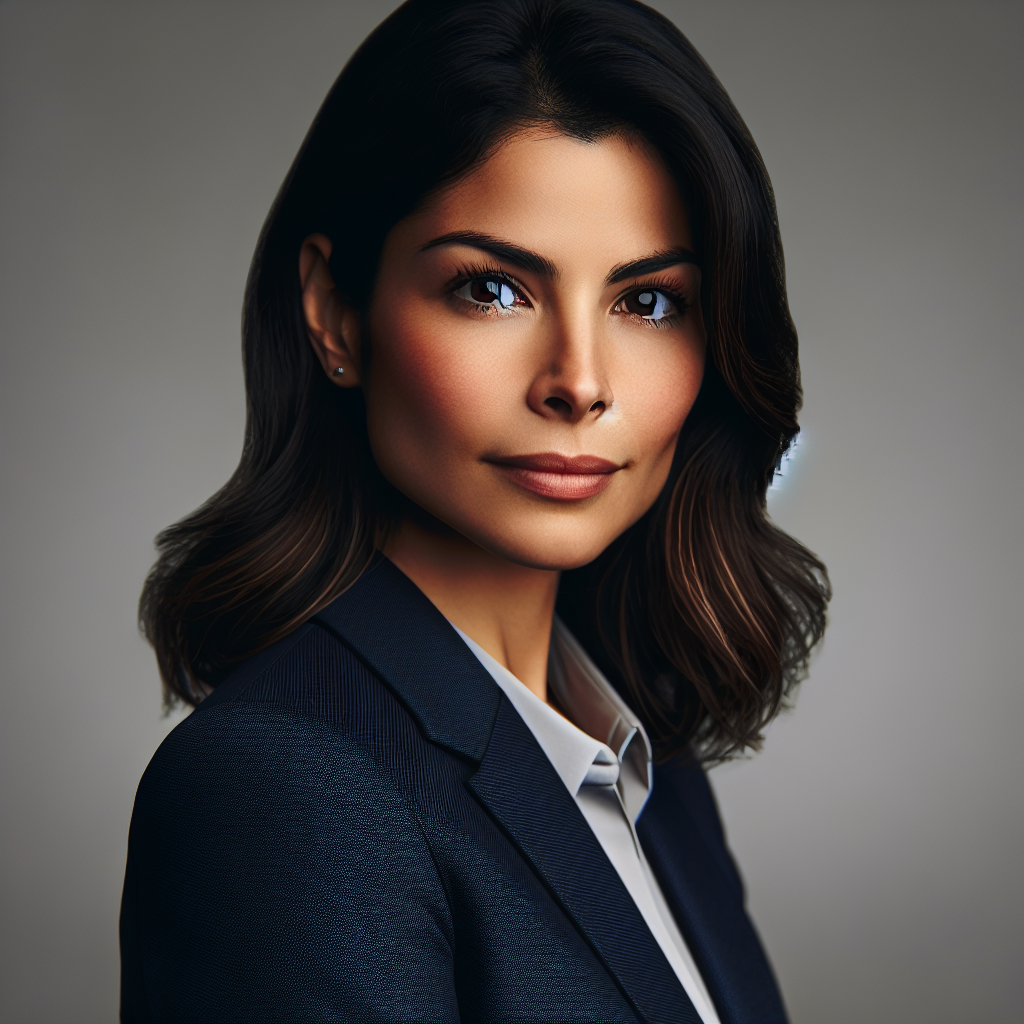
AI Avatar Generator: Create Custom Avatars & Profile Pictures (Free)
Your avatar is your digital identity. Whether it is a LinkedIn profile picture, a gaming persona, a social media icon, or a brand mascot, the right avatar makes a lasting impression. AI avatar generators now let you create custom, professional-quality avatars from simple text descriptions — no selfie uploads, no design skills, and no expensive software required. This guide walks you through the best AI avatar tools, proven prompts, and step-by-step techniques for creating avatars that stand out.
Design your perfect avatar with AI
AI2image lets you generate unique avatars and profile pictures using DALL-E 3. Get 3 free image generations when you sign up — no credit card needed.
What Is an AI Avatar Generator?
An AI avatar generator is a tool that uses artificial intelligence to create digital portraits, characters, or icons based on text descriptions or reference photos. These tools use advanced models like DALL-E 3, Stable Diffusion, and GANs (Generative Adversarial Networks) to produce unique avatars in virtually any style — from photorealistic headshots to cartoon characters, pixel art, and anime portraits.
Unlike traditional avatar makers that rely on pre-made templates and mix-and-match features, AI generators create entirely original images. You describe what you want — "a friendly female professional with glasses, warm smile, soft studio lighting, corporate headshot style" — and the AI produces a unique image that has never existed before.
Best AI Avatar Generators in 2026
Here is a detailed comparison of the top AI avatar tools available today:
| Tool | Avatar Styles | Input Method | Price | Quality |
|---|---|---|---|---|
| AI2image | Any style via prompt | Text prompt | 3 free, then $5.99/10 | ⭐⭐⭐⭐⭐ |
| Lensa AI | Stylized portraits | Photo upload | $3.99 for 50 avatars | ⭐⭐⭐⭐ |
| Dawn AI | Artistic avatars | Photo upload | Free tier / $4.99/mo | ⭐⭐⭐⭐ |
| ChatGPT (GPT-4o) | Any style via chat | Text or photo | $20/month | ⭐⭐⭐⭐⭐ |
| Midjourney | Artistic, detailed | Text prompt | $10/month | ⭐⭐⭐⭐⭐ |
| Ready Player Me | 3D gaming avatars | Photo upload | Free | ⭐⭐⭐⭐ |
How to Create an AI Avatar (Step-by-Step)
Step 1: Define Your Avatar Style
Before writing a prompt, decide on the style that matches your needs:
- Professional headshot: Photorealistic, studio lighting, corporate setting — ideal for LinkedIn and business profiles.
- Cartoon or illustration: Flat design, vector-style, vibrant colors — great for social media and creative brands.
- Anime or manga: Japanese art style with expressive eyes and dynamic poses — perfect for gaming communities and fan profiles.
- Pixel art: Retro 8-bit or 16-bit style — suited for gaming, Discord, and nostalgia-themed content.
- 3D render: Modern Pixar-like or claymation style — popular for tech profiles and NFT communities.
Step 2: Write a Detailed Prompt
Your prompt should include:
- Subject description: Gender, age range, facial features, expression, hair style and color.
- Clothing and accessories: Outfit, glasses, jewelry, headwear.
- Art style: Photorealistic, cartoon, anime, watercolor, oil painting, 3D render.
- Background: Solid color, gradient, scene, or transparent.
- Framing: Close-up portrait, bust shot, full body, icon-sized.
Example professional avatar prompt:
Professional headshot portrait of a confident young woman with shoulder-length brown hair, wearing a navy blazer, warm natural smile, soft studio lighting, neutral gray background, sharp focus, 4K
Example cartoon avatar prompt:
Cute cartoon avatar of a bearded man with round glasses, wearing a hoodie, holding a coffee mug, flat vector illustration style, pastel purple background, clean lines
Step 3: Generate, Iterate, and Perfect
The first result rarely matches your vision perfectly. Use these strategies:
- Generate 3-4 variations and pick the closest to what you want.
- Add more specific details to narrow down the result.
- Experiment with different art styles to see what suits you best.
- Adjust the background and framing to match where you will use the avatar.
Best AI Avatar Prompts by Category
Professional and Corporate Avatars
Professional corporate headshot of a middle-aged man in a dark suit, confident smile, studio lighting, blurred office background, photorealistic, 8KBusiness portrait of a young woman in smart casual attire, friendly expression, natural lighting, clean neutral background, LinkedIn profile picture styleExecutive headshot, silver-haired man with glasses, navy suit, warm studio lighting, shallow depth of field, professional photography
Cartoon and Illustration Avatars
Cute chibi-style character with big eyes, purple hair in a ponytail, wearing a cat ear hoodie, kawaii pastel colors, simple clean backgroundFlat vector illustration portrait, modern minimalist style, geometric shapes, bold colors, suitable for app icon, 1:1 aspect ratioDisney Pixar style 3D character portrait, friendly young man with curly hair, big smile, colorful lighting, smooth render
Gaming and Fantasy Avatars
Epic fantasy warrior portrait, glowing armor, magical fire effects, dramatic lighting, detailed digital painting, RPG character styleCyberpunk hacker character portrait, neon face paint, holographic visor, dark futuristic background, detailed sci-fi artPixel art RPG character, 32x32 style, knight with sword and shield, retro game aesthetic, clean pixel work
Anime and Manga Avatars
Anime portrait, young woman with cherry blossom pink hair, school uniform, sakura petals falling, soft pastel colors, manga art styleDark anime character, mysterious male with silver eyes, black cloak, moonlight background, detailed manga illustrationStudio Ghibli style character portrait, warm gentle expression, natural earth tone colors, hand-drawn feel, whimsical
Create Your Unique AI Avatar Now
Generate professional avatars in any style. 3 free credits, no credit card required.
Try AI2image Free →AI Avatar Use Cases
AI-generated avatars serve a wide range of purposes across personal and professional life:
Social Media Profiles
Stand out on platforms like Instagram, X (Twitter), TikTok, and YouTube with a unique avatar that represents your personal brand. Unlike selfies, AI avatars let you present an idealized version of yourself or an entirely original character. Many creators use AI avatars to maintain privacy while still having a recognizable online identity.
Professional Networking
LinkedIn profiles with professional photos receive 14x more views than those without. If you lack a professional headshot, an AI avatar generator can create a polished, studio-quality portrait in seconds. AI-generated professional headshots are now widely accepted on business platforms and look indistinguishable from real photographs.
Gaming and Virtual Worlds
Gamers use AI avatars for Discord profiles, Twitch channels, in-game identities, and streaming overlays. Fantasy and sci-fi styles are particularly popular in gaming communities. AI lets you create a character that truly represents your gaming persona without commissioning an artist.
Brand Mascots and Team Avatars
Startups and small teams use AI to generate consistent avatar sets for team pages, chat apps, and internal tools. You can create a cohesive visual identity by using the same style prompt for all team members, then customizing individual details.
Tips for Better AI Avatars
Consistency Across Platforms
Once you find an avatar style you love, save your prompt and reuse it with minor variations. This ensures your brand identity stays consistent across LinkedIn, X, Discord, GitHub, and other platforms. A recognizable avatar builds trust and recall.
Resolution and Sizing
Different platforms require different image sizes. Generate at the highest resolution available, then crop and resize as needed:
- Instagram: 320x320px (displayed), upload at 1080x1080px
- LinkedIn: 400x400px minimum, 800x800px recommended
- Discord: 128x128px displayed, upload 512x512px or higher
- X (Twitter): 400x400px recommended
- YouTube: 800x800px recommended
Avoiding Common Mistakes
- Too much detail: Avatars are displayed small. Keep designs clean with bold shapes and high contrast.
- Busy backgrounds: Use solid colors or simple gradients. Complex backgrounds get lost at icon size.
- Inconsistent lighting: Specify the lighting direction in your prompt for a professional look.
- Generic prompts: "A person" gives bland results. Be specific about features, expression, and style.
Free vs Paid AI Avatar Generators
Free Options
- AI2image: 3 free DALL-E 3 avatar generations with full quality output.
- Ready Player Me: Free 3D avatars for gaming and virtual worlds.
- Picrew: Free template-based avatar maker (limited customization).
- Stable Diffusion: Free if self-hosted with a GPU — unlimited avatar generation.
When to Go Paid
- You need avatars that closely resemble your real appearance (photo-trained models).
- You want batch generation for a team or brand (10+ consistent avatars).
- You need the highest resolution and quality for print or large display.
- You require commercial licensing for client projects or resale.
Frequently Asked Questions
What is the best free AI avatar generator?
AI2image is one of the best free options, offering 3 DALL-E 3 powered avatar generations with no credit card required. It supports any avatar style through text prompts. For 3D gaming avatars, Ready Player Me is completely free. If you have a GPU, Stable Diffusion offers unlimited free avatar generation.
Can I create an AI avatar that looks like me?
Yes, but results vary by tool. Photo-based tools like Lensa AI and Dawn AI use your uploaded selfies to train a model that generates stylized versions of your face. Text-based tools like AI2image create avatars from descriptions, which gives you more creative freedom but won't replicate your exact features without a reference photo.
Are AI-generated avatars safe to use as profile pictures?
Yes, AI-generated avatars are safe and widely accepted as profile pictures on all major platforms including LinkedIn, X, Instagram, and Discord. They offer privacy benefits since they do not reveal your real appearance. AI avatars created with DALL-E 3 through AI2image are yours to use commercially and personally.
What size should my AI avatar be?
Generate avatars at the highest resolution available (1024x1024 or higher), then resize for each platform. LinkedIn recommends 800x800px, Instagram uses 1080x1080px, Discord displays at 128x128px but accepts larger uploads, and X (Twitter) recommends 400x400px. Square aspect ratios work best for profile pictures across all platforms.
How do I make my AI avatar look professional?
Include "professional headshot" or "corporate portrait" in your prompt. Specify studio lighting, a neutral or blurred background, and business attire. Add details like "sharp focus", "4K resolution", and "shallow depth of field" for photographic quality. Avoid busy backgrounds and overly artistic styles for business profiles.
Create Your Perfect AI Avatar Today
3 free generations. Any style. Professional quality in seconds.
Try AI2image Free →Try this prompt:
Professional headshot portrait of a confident young woman with shoulder-length brown hair, wearing a navy blazer, warm smile, soft studio lighting, neutral gray background, 4K
Try this prompt:
Cute cartoon avatar of a bearded man with round glasses, wearing a hoodie, holding a coffee mug, flat vector illustration style, pastel purple background
Try this prompt:
Anime portrait, young woman with cherry blossom pink hair, school uniform, sakura petals falling, soft pastel colors, manga art style